Posted on

Creating Curves with Border Print

My Windows quilt appears to have border print circles in several places.

The curves are actually an illusion: the four different circular bands in the quilt are made up of small wedges of fabric that have straight sides.  However, by dividing the bands into pieces, you can get the appearance of curves. the quilt center is shown here.

Jinny’s Windows quilt, made to honor the victims of the 9/11 attacks.

Let’s look at the center of the quilt first. The center block, Liberty’s Crown, appears to be a circle.  However, look at the line drawing: the very center “circle” is actually a polygon with 16 sides, and the circular “frame” around it is actually made from 16 wedges.

All the sides of the wedges are straight lines, but because the lines are quite short, when the wedges are sewn together, the section appears curved.

The frame around the center image appears circular but is actually made from 16 wedges.

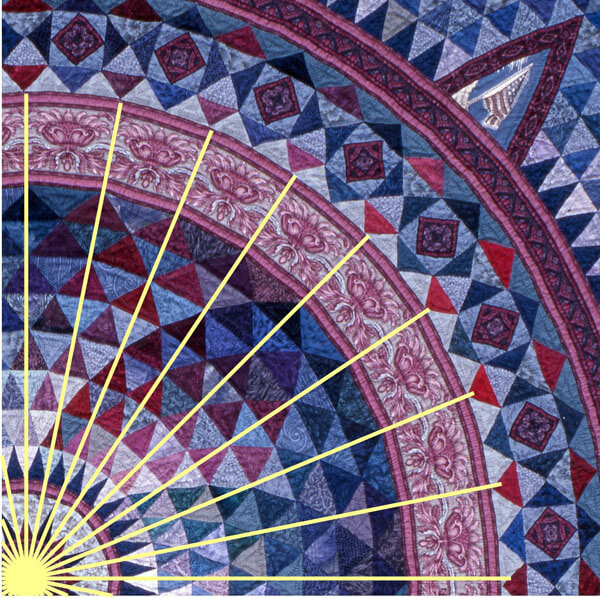
There are four bands of “curved” border print fabric in the quilt.  The smallest band (the one around the center patch with Lady Liberty) is made from 16 wedges; the outermost band is made from 128 wedges!

This band in the quilt was divided into 32 sections. One quarter of the quilt center is shown here.

Here’s how you can convert a circular band to use this technique.

1. Divide the band into segments. For the example below, I’ve used just eight segments rather than the 32 in the quilt. (The larger the circumference of the band, the more segments you’ll need to maintain the illusion of curves.) Using a computer makes this super-easy, but you can also use a protractor to determine the position of the angled lines.

Divide the circle into equal sections.

2. Replace the curved lines between your angled lines with straight lines. (Remember that this will change the shape of the patches above and below the band, too.)

3. Trace over the wedge to get your finished patch size and add a ¼” seam allowance all around.

Make the template, adding the seam allowance to the outside.

This technique will work for any fabric, but because I wanted to use border print fabric, there were two more things I had to do.

First, I wanted the band to include a printed stripe around the inside and outside of the band because I like the way this frames an element in a quilt. So I needed to make sure that the band in my quilt was the same height as the border print I had selected.

After drawing the straight line between two angles on the inside circle of my band, I drew the second line the width of the border print (4 ½”) above the first. After adding the seam allowance around the edges, my template was the perfect size for cutting the border print.

The height of the wedge should match the width of the border print stripe plus seam allowances.

Secondly, for the design to flow smoothly around the band, I needed to cut identical fabric patches, all of which had the same mirror-image element  centered in the patch. (The blue line on the template indicates the mirror image.)

The template is used to cut identical wedges from the border print fabric.

Creating curves with border print fabric isn’t something you can accomplish “lickety-split”, but it also isn’t as hard as it might seem.  It just takes some time and patience.

For even more information, see my book, Quiltmaking by Hand,  pages 139-141 and 154-155.

Posted on

Creating Border Print Squares

Squares are the most common shape in patchwork blocks. If a block includes a large center square, consider replacing it with a border print square made from four identical triangles. Or, rather than alternating pieced blocks with plain ones, use border print squares for the alternate blocks for lots of impact with very little sewing!

Download Border Print Squares Made Easy for future reference.

Step 1

Determine the finished size of the square needed. Divide the square diagonally from corner to corner to create four triangles as in the diagram, right. Make a template from one of the triangles from see-through template material. Be sure to add a ¼-inch seam allowance around all sides of the piece. Draw a line down the middle of the template as shown, to use as a mirror line.

Make a template by tracing around one of the triangles, then drawing 1/4″ outside those lines.

Step 2

Using the mirror line as a guide, center the template on one of the motifs in the border print fabric, making sure that a line from the border print falls just inside the sewing line on the long side of the triangle template. (This ensures that you will have a nice line or frame around the outside of the finished square.) Mark some portion of the design directly onto the template to use as a guide for cutting the remaining pieces. Carefully draw around the template and cut the piece out.

If you want to see what the square will look like before actually cutting the pieces, position the template onto the fabric, then place two mirrors on the two short sides of the triangle so they meet at a right angle. Carefully remove the template to see what the finished square will look like.

Center the mirror line on the fabric motif and draw a portion of the fabric design onto the template.

Step 3

Cut three more triangles identical to the first, then sew them together to complete the square. Placing your triangle on different portions of the border print will produce different effects!

Four identical triangles sew together into a gorgeous border print square.

Simply changing the position of the template on the fabric creates a host of designs.

Posted on

Creating Perfectly Matched Designs

To create kaleidoscopic effects in patchwork blocks, each of the fabric patches must have identical designs.

However, even though you work really hard to cut the pieces exactly the same they do not always match. Because fabric can stretch during printing or cutting, even though the mirror line on the template runs exactly down the middle of the mirror line on the fabric, it is possible that the opposite sides of the patch will not have exactly the same motif as the left side. Sometimes it is off by as much as an eighth of an inch.

So how to get that perfect kaleidoscopic effect? Simple! When pinning the pieces for sewing, line up the design printed on the fabric, not the edges of the patches. If one of the pieces is off by an eighth of an inch, then the other side will be off by the same when you sew the other side. These off-set pieces will even each other out and the designs will line up perfectly.

As indicated by the arrows, the fabric design does not match exactly on both sides.

Although the seam allowances are uneven on each seam, they will even out over the whole unit.

By matching the design and not the fabric edges, you get a perfectly matched unit.

Posted on 2 Comments

Border Print Place Mat & Table Runner

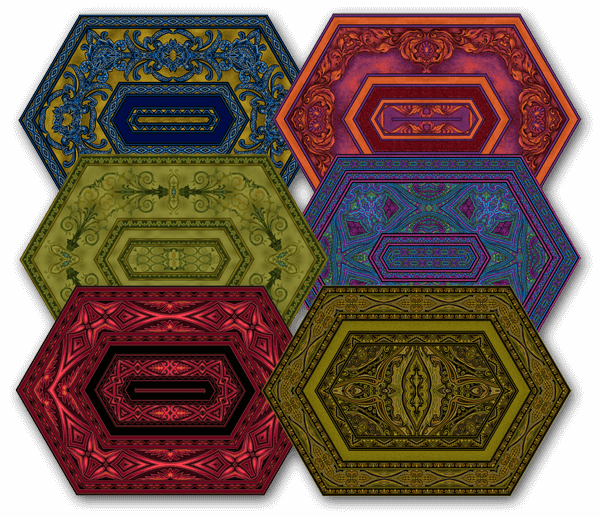
Jinny’s border print place mats and table runner are a great project to begin exploring the possibilities of her signature fabric designs.

In this video, Jinny gives you an overview of the project and shows you some wonderful examples of what’s possible.

Download the free pattern and make up a set of place mats in just a day!  All you need is 1/2 yard of border print fabric for each place mat, or 2 yards for a table runner.

Browse all of Jinny’s border print fabrics here.

Download Place Mat & Table Runner Pattern

Posted on

An Introduction to Working with Border Print Fabrics

Jinny’s border print fabrics are designed by a quilter (Jinny, herself) for quilters.  As a result, the fabrics can be used with minimum waste and maximum design possibility.

Watch the video to learn:

  • how Jinny first began using border prints in her quilts
  • how to identify the seam allowances between stripes in the fabric
  • how to calculate how much fabric is needed to frame a quilt with border print
  • how to find mirror-image motifs in the fabric for great design possibilities

Then be sure to explore this Working with Border Prints tips section to find all the free patterns and instruction on using border print fabrics in your quilts.