Posted on

Fussy Cutting Border Prints for Hexagons

My first patchwork quilt was a Grandmothers Flower Garden design, made with hand block printed fabrics, purchased from local textile markets in India where I was living at the time. Little did I know that that quilt would catapult me into a world of design and color that would affect the rest of my life.

More than 30 years ago I purchased an antique quilt made in the early 1800’s. I had already been “fussy cutting” border print fabrics and mirror imaged fabrics to create interesting effects and I was thrilled to see that the maker of that quilt had “fussy cut” motifs in the fabric to center in each hexagon.

Border prints with their mirror image motifs can lend another level of interest altogether and give a wide variety of diversity to the design. For the best effect, use the ring of hexagons around the central piece.

To fussy cut hexagons, mark a mirror line down the middle of the template. Center the mirror line over a mirror-imaged portion of the border print, then draw some portion of the fabric design directly onto the template. This will provide a guide for cutting five more identical pieces for the first ring of hexagons.

Place the template on on a variety of different mirror motifs in the border print. There will be very little waste when you cut pieces in this way. The challenge is to see how many different designs you can get from just one fabric.

Cutting hexagons in the positions above creates all these different looks.

Some of the effects are achieved by simply turning the hexagons upside down. See the examples below: both blocks use the identical patches, but the striped portion is positioned toward the outside of the block in the first example, and the inside of the block in the second.


Tip Notes

Jinny set her hexagons with a diamond path.  These are the shapes she used.

Fabrics used in these illustrations are from the Ashford Collection:
Border Print:1695-04
Light Background: No Longer Available.
Red Accent: 1696-04

Posted on 3 Comments

Fragmenting: A Whole Quilt Design from a Single Block

I often use fragmenting when designing quilts. The concept of fragmenting a traditional patchwork block is not new. It has been used for centuries with the traditional Lone Star design.

In the Lone Star design, each of the diamonds of a traditional eight-pointed star has been broken up into the same number of smaller diamonds.


The diamond units in a traditional eight-pointed star block (left) can be fragmented (center). We know this “fragmented” design as the Lone Star quilt. You can fragment the background squares and triangles, too. That’s what I did for my Stained Glass Star quilt!

Traditionally, each round of diamonds from the center outwards is the same fabric. I used this same idea to create the quilt, Star Sapphire. Each of the diamonds has been broken into eight divisions per side, but the coloring is different from that of a  traditional Lone Star. I treated each large diamond unit as being made up of four smaller diamonds, and then shaded the patches within each of those four diamonds to create a non-traditional effect.


In the traditional lone star design (right) the colors radiate out from the center with each round of color the same in each diamond unit. In Star Sapphire (right), I switched up the color shading to get a design with a more faceted look.

When I developed the idea of fragmenting an entire design, I still started with a traditional quilt block.  However, then I broke all the shapes in the design into smaller versions of that same shape. Each shape had the same number of divisions. In addition, when coloring the fragmented shapes, I shaded each of them from light to dark. Let’s look at a recent example.


I developed Rajasthan from a traditional design called Beginner’s Delight. Below you can see the original design, the fragmented version and finally the quilt. The larger sized quilt uses four of the blocks. And rather than fragment the central square, I opted to use a border print square. (You can learn how to do this in my Creating Border Print Squares lesson.)

The Rajasthan wall-sized quilt is really just one big block!

The larger version of Rajasthan is four blocks sewn together. A border print triangle is used in one corner so that when the quilt is assembled, you get a center medallion.

How to Fragment Your Own Block

Fragmenting is fun.  It gives you the opportunity to really play with color and shading, or simply to use lots more fabrics. When selecting a design, a simpler one will best.

To fragment the block:

  •     Divide each side of each shape into the same number of equal divisions.
  •     Draw parallel lines from the sides of the shape to one of the other sides.
  •     Draw the second set of lines.

With a triangle, you need a third set of lines. Sometimes I find this last set makes the shape too busy and I opt to eliminate it.


Because a triangle has three outside lines, none of which are parallel, to fully fragment the shape you need to draw three sets of lines (Triangle 3). However, you could decide to just stop at two sets of lines as in Triangle 2 and use diamond-shaped patches to fill the unit. You might also decide to remove a different set of lines as in Triangle 4: in this example, you’ll fill the shape with square and half-square triangle patches.

Shade the units from light to dark. Try shading in various directions until you find the one you like best.


Different light-to-dark progressions can make a big difference in how your quilt will look. Having the lightest fabric in one unit against the darkest in another unit can create a nice glow. Take another look at Star Sapphire to see how this can work.

For more detailed information on fragmenting, coloring fragmented designs and creating templates for each of the shapes, see pages 45 to 48 of my book, The Quilters Album of Patchwork Patterns.


For other examples of my fragmented quilt designs, take a look at Mayflowers, Summer Lily,  and FabergéAll of them are free pattern downloads!

Posted on 1 Comment

Drafting Quilt Blocks

While working on my first book, Patchwork Patterns, I kept finding designs that were based on a 5 x 5 grid. Since I did not know how to fold a piece of paper to get five equal divisions I set them aside and was not going to use them. But before long there was a stack of those designs. Someone had shown me how to fold a square and get a five pointed star, so it seemed logical to me that there must be a way to fold a square and get five equal divisions. I sat down with a stack of squares and started experimenting and finally found a way!

The following day I was leaving on a trip and figured the airplane ride would give me a good opportunity to write down what I had discovered. Working with a paper napkin, I folded and wrote, folded again and wrote some more until all the steps were explained.

Finally a man sitting next to me asked “What are you doing?” I proudly answered that I had just figured out a way to fold a square and get five equal divisions and proceeded to show him. He looked on with interest and when I was finished with my demonstration he said, “That is very interesting, but there is a much easier way to do it.” He showed me in 30 seconds how easy it is. I was dumbfounded and have used the technique ever since, not for just five divisions, but for any number of equal divisions. Here it is:

If I want to divide a 7¾” square into five equal divisions, it would be hard to do the math and count off all the tick marks.  If my square were 10 inches then it would be very easy to do. I would simply mark a division every two inches. Well, all you have to do is to pretend that the square is 10 inches.

Step 1. Angle the ruler across the square so that zero is on the left side of the square and 10 inches falls on the opposite parallel side.

Step 2. Make a mark every two inches and you will have five equal divisions.


Step 3. Using a ruler or triangle with a 90 degree angle, line it up to the dots and draw the lines as shown

Step 4. Turn the paper 90 degrees and repeat steps 1-3 to get the lines going in the other direction. It is best to use a different colored pencil for the dots so that you do not get the first set of dots mixed up with the second.

For a more detailed explanation of this technique see The Quilter’s Album of Patchwork Patterns, pages 29-32.

Posted on

Computer as a Color Tool

Often we see a photograph, a flower, leaf or other image that has breathtaking colors. We may want to try to recreate those colors, but never seem to quite get it right. The two images shown here are of the American flag. The first image is the regular photograph. The second one has the individual colors in the photo selected.

We would say there are three colors in the flag — red, white and blue. Yet, when you see an American flag blowing in the wind, your eye perceives so many more than just three discrete colors.  The play of light and shadow and the transparency of the flag translates our glorious red, white and blue into dozens of shades and hues.

I often use my computer to find the colors in an image such as this and then work with those colors in a quilt project. This is how I do it using Adobe Photoshop. Other image editing software will work in a similar way.

  • First, if I’m not using a digital image, I scan the picture or object at a very low resolution (the dpi or pixel setting). When I want to see individual squares of colors, I set the dpi to a very low number.
  • If you already have an electronic image, open it in your photo editing software and set the resolution to a very low number such as 8 or 10 dpi.
  • Next, use the eye-dropper tool to select a color from one of the squares.
  • Then, make a selection box below the image and use the paint bucket tool to fill that selection with the color. I continue making boxes and filling them with the colors in the image.
  • Finally, I rearrange the boxes in a shaded order and I have a palette of colors to refer to when selecting fabrics for my project!

There are also some wonderful automatic “palette generator” tools on the web. They will pull colors from an image that you upload from your computer. Use an online search engine to find automatic color palette generator or try this one:

http://www.cssdrive.com/imagepalette/

Posted on 2 Comments

Color’s Impact on Design (Stony Creek)

During a Jinny Beyer seminar session on color shading, participants created full-sized quilt mock-ups from strips of fabric pasted to paper foundations.

Each mock-up is a variation of a single, original Jinny Beyer quilt design called Stony Creek. Each mock-up uses the same fabrics and the same quilt design. However, the fabric placement varies in each version.

Jinny explored this color exercise, and how shading creates special effects, in the May/June 2010 issue of Fons & Porter’s Love of Quilting magazine.

Posted on 2 Comments

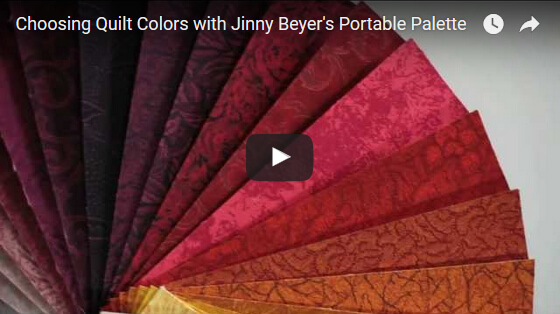
Choosing Quilt Colors with the Portable Palette

Jinny’s Portable Palette is an indispensable tool for choosing colors for your quilts.

It’s very similar to a painter’s fan deck of colors. The Palette includes a 1¾” x 7″ swatch of each of the 150 fabrics in Jinny’s Palette Collection. The fabrics shade beautifully from one color to the next, making it easy to find a range of colors that will work with your focus fabric, inspiration photo or color scheme.

Watch as Jinny shows you how to use the Portable Palette in variety of ways that are sure to help you choose the colors for your next quilt. And get more details on the Portable Palette below.
More on the Portable Palette


Posted on 190 Comments

New Block of the Month for 2017

Graphic for Blog


For the last several years I have been offering a free block of the month quilt pattern to subscribers to our monthly newsletter.

A few months ago, we sent out a survey asking what type and style of project you would like to see for next year’s Block of the Month and we have taken your suggestions to heart. The most popular design ideas were:

  • Wall hanging
  • Medallion style
  • Piecing and appliqué
  • Mystery quilt

For 2017, we have listened and took your suggestions. Instead of a full size quilt, the project is smaller, only 47” x 47”. It is medallion style and it is a mystery quilt with both appliqué and piecing. Instead of a block each month there will be portions of the design to put together.

I have designed the quilt to be a learning experience and it incorporates various piecing techniques so that by the time you finish you will be able to tackle any patchwork project.

Many of you know that I sew all my quilts by hand. One of the reasons is that handwork is portable and you can take it anywhere you go. I have seen a real resurgence of interest in hand piecing the last couple of years and this quilt is a great project to do by hand even if you have never tried hand piecing before. Each clue is a learning step to the next one and, if you choose to sew by hand, by the end of the year you will be an expert. If you prefer sewing by machine, the pattern is written for both hand and machine sewers.


Taping Take Two
Our classroom was transformed into a film studio to produce the videos for the new BOM mystery quilt. We were lucky to find a videographer right in our neighborhood, Adam Vogtman.


We will begin with simply sewing a straight line, then joining four points, curves, eight points, setting in seams, appliqué and so on. There will be video clips to go along with the clues with links to these in each newsletter. The quilt is not a huge project and you should easily be able to complete each clue during the month.

I have designed this quilt in the four colorways shown above. You can pre-order your kit and it will be shipped starting January 20th, so by the time the first clue comes out in February you will be ready to start!

In order to receive all the clues for the BOM, you must be a subscriber to our free monthly newsletters. The links to all patterns and videos will only be in our newsletter. If you have not yet signed up you can do so here.

Watch for more information on this program in Saturday’s newsletter. I hope you are as excited about this as we are.

Posted on

Mirror-Image Patches & Border Print Diamonds

In many quilt blocks, cutting identical patches and then sewing them together creates beautiful effects. (This tip has more on that technique.)

Sometimes, however, you need to sew a patch to its mirror-image. Fortunately, that’s easy to do!

In the Queen’s Crown block, the illusion of a border print frame is achieved by putting one patch right beside another that is its exact mirror image. If two patches will meet, using one regular and one mirror-image patch will allow the design to seem to reflect naturally around the corner.

Mark the design motif on your template and use it to cut the number of regular patches you need.

Then, just flip the template over and use it to cut your mirror-image patches, lining up your design motif markings with the matching motifs on your fabric.

Although the two diamond patches seem very similar in the block, their differences are more apparent here when pulled out of position. (The red lines indicate the sides that adjoin each other in the block.)

Border Print Diamonds

You can create spectacular effects using this technique in diamond-shaped patches. To create a border print diamond, you need four triangles: two are the same and two are exact mirror images.

Here’s how you do it.

1. Divide the diamond in half lengthwise and crosswise. Make a template from one of the four resulting triangles. Add the seam allowance to the outside and an arrow to show the lengthwise grain of fabric.

After dividing the diamond, make a template from one of the sections.

2. Position the template onto the fabric and draw a design motif from the fabric onto the template. Cut two identical triangles. These are the regular triangles.

3. Now, flip the template over and align the markings on the template with the fabric grain and the matching design motif on the fabric. Cut two of these triangles. These are the mirror-image (or reversed) triangles.

You will have two sets of mirror-image triangles that form an intricate-looking diamond when sewn together.

Posted on

Making Other Shapes in Border Print Fabric & Paisleys

Other geometric shapes can be made with a border print fabric in the same way as a square. The secret is to divide the shape into identical triangles. Create a template for that triangle (be sure to add the seam allowance), then cut as many triangles as you need from identical portions of the border print.

For detailed information on using border prints in many ways, download Making Magic with Border Prints Booklet.

Another great reference is Tips on Fussy Cutting Patches — another free download!

Posted on

Magical Effects with Border Print Fabrics

Quilters have been fussy-cutting fabric since the very beginning, and border prints create unique effects when cut carefully to fit in a specific patch.It can be as simple as replacing a single patch in a block or subdividing a large shape and using an identical piece of border print in each of those new pieces.

Watch the video to see how much impact you get with this technique and to see Jinny demonstrate how to modify a block to get that border print special effect.